 Technical
Technical floor plan
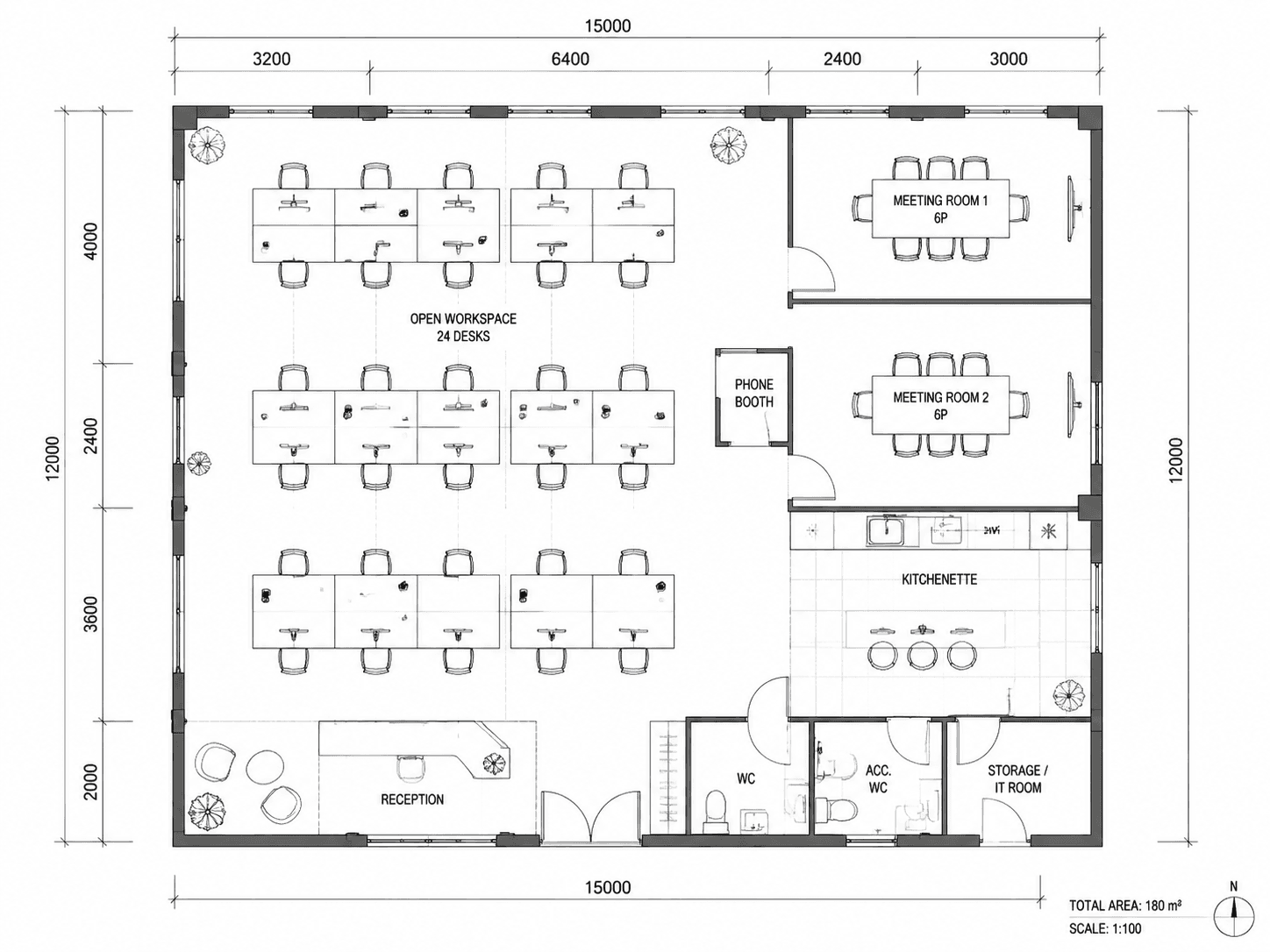
"Small open-plan startup office floor plan for 24 desks, 2 meeting rooms, 1 phone booth, kitchenette, reception"
Office floor plan ai for teams of any size. Generate office layouts — desks, meeting rooms, phone booths, breakout space — from a single sentence. The ai office floor plan generator outputs 2D, 2.5D and 3D layouts in seconds, with optional dimensions. Free trial — 1 office floor plan on Google sign-in.
Describe your office in one sentence — desks, meeting rooms, phone booths, breakout space, kitchenette. Or use the Template tab counters. Choose a drawing style and the office floor plan ai renders the layout. Google sign-in required; your first office floor plan is a free trial.
Text-to-image · 20–60s
Every example below was rendered by the office floor plan ai from a single text prompt — small office floor plan, open office floor plan, executive office floor plan and corporate office floor plan. Different drawing styles, same office floor plan ai generator.
Technical"Small open-plan startup office floor plan for 24 desks, 2 meeting rooms, 1 phone booth, kitchenette, reception"
 2.5D
2.5D"Modern office floor plan for a creative agency — 40 desks in pods, 3 meeting rooms, breakout lounge, kitchen, ~280 m² with dimensions"
 3D Isometric
"Executive office floor plan: 6 private offices, boardroom, open desk pool for 12, reception area, ~180 m²"
 Watercolor
"Corporate office floor plan on an office tower floor — 60 hot desks, 4 phone booths, 2 meeting rooms, cafe corner, ~420 m²"
From a one-line office brief to a downloadable office floor plan in three steps. No CAD, no architect deposit, no learning curve — the office floor plan ai does the architectural drafting for you.
Type the headcount, seating style and rooms you need: 'Open office floor plan for 40 desks, 3 meeting rooms, 2 phone booths, kitchenette and reception, ~320 m² with dimensions.' The office floor plan ai parses the brief and starts the layout.
The office floor plan ai renders the full top-down layout — walls, doors, labelled rooms, desk pods, meeting rooms, circulation — in your chosen architectural drawing style. Each office floor plan ai render takes 20–60 seconds.
Save the result as a high-resolution PNG, ready for tenant proposals, TI briefs and all-hands decks. Refine the prompt and re-generate to test alternative office floor plan layouts.
Six things the office floor plan ai does well today — built for early-stage TI sketching, capacity planning and tenant proposals. The ai office floor plan generator handles plain-English briefs end to end.
Describe headcount and seating style in plain English — the office floor plan ai lays out workstations, pods, hot-desks or private offices with sensible spacing. The ai office floor plan generator handles small office floor plan grids, open office floor plan layouts and executive office floor plan suites the same way.
Specify how many meeting rooms, boardrooms, phone booths and breakout areas you need. The office floor plan ai distributes them along the perimeter or core as you prompt, so the resulting office floor plan matches the way your team really works.
Technical 2D blueprint for the architect, 2.5D office floor plan for a tenant pitch deck, 3D office floor plan isometric for the all-hands. Same prompt, different rendering style, all generated by one office floor plan ai.
Mention 'with dimensions' or a target square-meterage in your prompt and the office floor plan ai will annotate room sizes and overall area. Useful for capacity planning, TI briefs, tenant proposals and office building floor plan documentation.
Try the office floor plan ai free for 1 plan after one-click Google sign-in — no card required. Then $19/mo for 300 office floor plans, or $19 one-time for 240. Credits never expire. Cancel any time.
Every office layout prompt, reference image and generated office floor plan stays yours. We do not train models on your office floor plan ai inputs and we don't share them with third parties.
Three audiences, one office floor plan ai. Whether you're sketching your first HQ, replanning a floor or pitching a tenant improvement, the ai office floor plan generator fits the workflow.
Test if 40 desks really fit in that 320 m² shell before signing. Generate three small office floor plan options in five minutes with the office floor plan ai, share with co-founders, then bring the chosen one to your TI architect.
Need to redo desk layouts after a re-org? Describe the new structure to the office floor plan ai in one sentence, get a printable PNG office floor plan with dimensions, walk the floor with your facilities team — no draftsperson fee.
Prospect asks 'can you show what 60 people look like in this office space floor plan?' Send a rendered office floor plan ai mock in under an hour — turn cold leads into negotiations without engaging a drafter.
Pick a plan that fits your usage. Yearly saves 20%. One-time = no recurring billing, ever.
1 credit on signup
Try the AI floor plan generator with no commitment.
300 credits / month
For homeowners, creators and 3D designers who want unlimited renders.
1500 credits / month
For real estate teams shipping floor plans and 3D listings daily.
Common questions about the office floor plan ai — accuracy, capacity, office types supported, file formats, privacy and roadmap.
Describe your office. Get an office floor plan ai render in seconds. Google sign-in required. First office floor plan free trial, no card needed.